If you’ve ever sent a design file to a print shop and been asked for “the vector version,” or watched a logo turn blurry the moment it was enlarged on a banner, you’ve already run into the difference between rasters and vectors. These are the two fundamental ways a digital image can be built, and understanding how they differ — in resolution, file size, editability, and printability — can save you time, money, and frustration on any design project.
What Is a Raster?
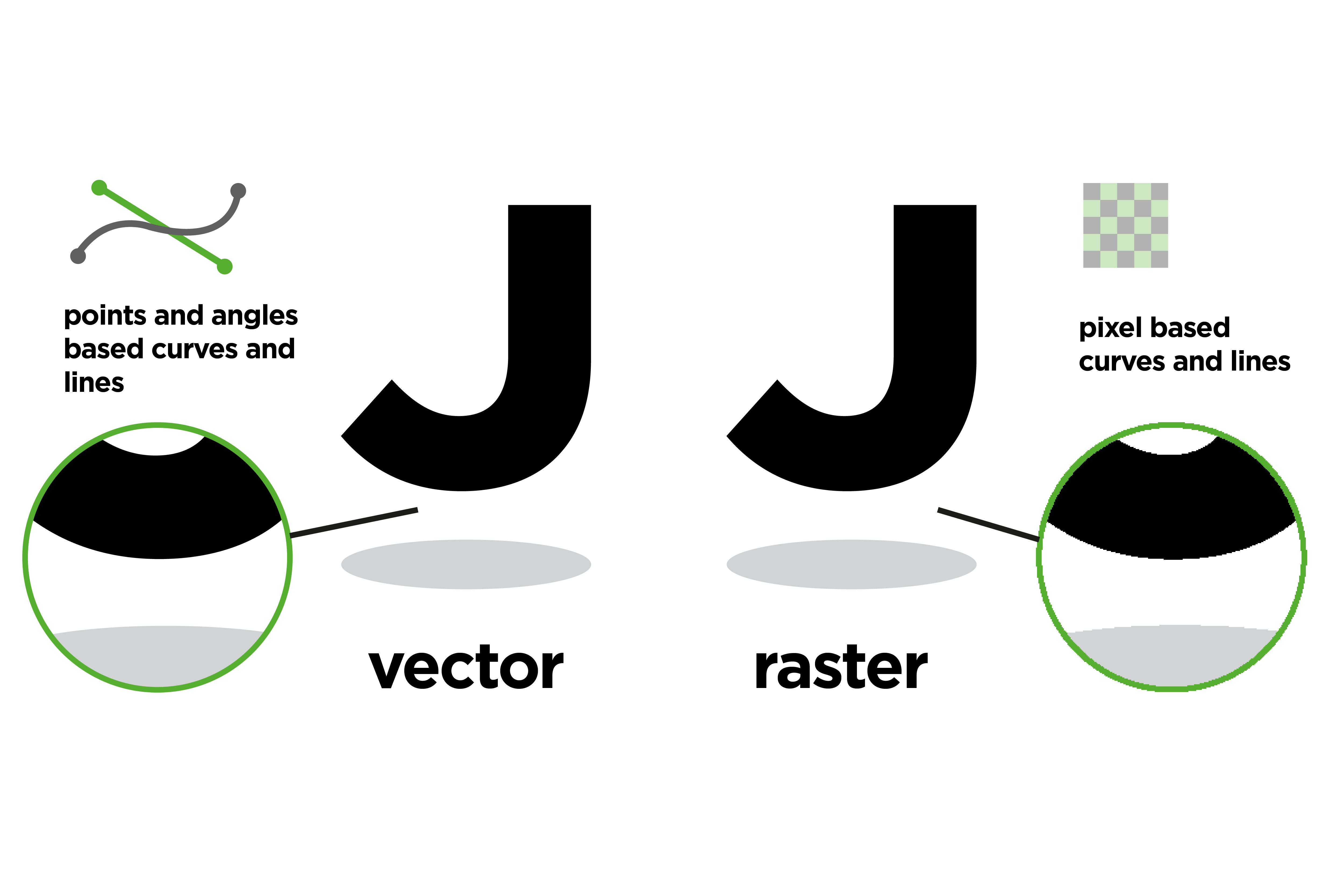
Raster images are made of little squares called pixels that use colour and tone to create an image. They’re produced by digital cameras, by scanning images into a computer, or with raster-based software.
Each image can contain only a certain number of pixels, and that number determines the image's resolution (quality) — fewer pixels mean lower resolution. More pixels, on the other hand, result in higher quality (at the same size or larger than the original), but also increase the amount of space needed to store the file.
At the “normal” image size, pixels form a complete, smooth image; but if the dimensions of the raster are increased beyond its original size, the individual pixels become visible, distorting the image.
Advantages Of Raster Files
Intricate Detail and Realism
Raster images can display minute details, subtle gradients, and wide colour variations. This makes them the perfect file format for media that requires realism, such as photographs.
Universally Compatible
Raster file formats are easily accessible: they’re compatible with most operating systems, devices, and design software. Many digital cameras automatically shoot and save photos as raster files — and the images you see online are often rasters, too. They’re easy to view, edit, and share.
Precision Image Retouching
Rasters allow for extremely precise image retouching down to the individual pixel level.
Limitations Of Raster Files
Quality Decreases when Enlarged
A raster image is resolution-dependent — enlarging it beyond its original size just stretches the existing pixels rather than increasing their number. This not only results in less detail but also makes the pixels’ square edges visible, reducing the image’s sharpness.
Larger File Sizes
High-resolution raster images require a lot of storage space.
Unsuitable for Certain Graphics
Graphics like logos, icons, and illustrations need sharp lines and infinite scalability — two things rasters can’t provide.
What Is a Vector?
If a raster file stores a finite grid of coloured pixels forming an image, a vector file stores the “instructions” for how the image should be drawn.
Vectors aren’t pixel-based; instead, they use mathematical formulas to define the shapes into which colour fills are placed. This makes vectors infinitely scalable (up or down): the formulas for shapes and colour fills are simply recalculated at the new size.
Advantages Of Vector Files
Infinite Scalability
As mentioned, since vector graphics are based on mathematical formulas, they are resolution-independent: they can be easily resized up or down without losing clarity.
Smaller File Sizes
High-resolution raster files store data for thousands (or even millions!) of pixels, while vector files store only instructions for generating shapes and colours. This makes vectors much smaller in size than raster images.
Easier to Edit Individual Elements
Vector files make it simple to edit individual elements. The design components within a vector file (shapes, lines, text, colours…) can be edited independently without affecting the entire image.
Limitations Of Vector Images
Not Suited for Complex Images
Vector graphics are best suited to simple images and have limited ability to represent fine detail or complex gradients, shadows, and textures.
Limited Realism
In the same vein, vectors can’t replicate the natural realism of raster images. They’re best suited for clean, flat designs.
Potential for Software Incompatibility
Vectors are much less accessible than rasters. Many vector file types require specialised software to open and edit, while other programs or platforms might not support vectors at all. Converting vectors into rasters could lead to a loss of quality or features.
What Are the Differences Between Rasters and Vectors?
Resolution
The resolution of a raster file is referred to in DPI (dots per inch) or PPI (pixels per inch). When you zoom in, you start seeing the individual pixels.
With vector image files, on the other hand, resolution is not an issue. You can resize, rescale, and reshape vectors infinitely without losing any image quality.
Uses
Raster files are used for photographs, image editing, and graphics, as they display a wider array of colours, allow greater colour editing, and render finer lighting and shading more accurately.
Vector files work better for digital illustrations, logos, and graphics with clean lines and shapes: in general, they’re perfect for assets that need to be printed in both very small and very large formats.
File Size
As mentioned, raster files contain massive amounts of information with incredibly high levels of detail, while vector files are much more lightweight.
A raster file’s large size can make it cumbersome to store on your device and slow down page load times on the web. However, to avoid these issues.
Compatibility and Conversion
Raster files are easier to view, open, edit, and share than vector files, which often require specialised software to open and modify.
File and Extension Types
Both rasters and vectors have multiple extension types, each with its own features. Here are some of the most common ones:
Raster File Types
- Joint Photographic Experts Group (JPEG) —.jpg
- Portable Network Graphics (PNG) — .png
- Graphics Interchange Format (GIF) — .gif
- Bitmap Image File (BMP) — .bmp
- Tagged Image File Format (TIFF) — .tif
- Adobe Photoshop File (PSD) — .psd
Vector File Types
- Scalable Vector Graphics (SVG) — .svg
- Encapsulated PostScript File (EPS) — .eps
- Adobe Illustrator File (AI) — .ai
- Collaborative Design Activity (COLLADA) — .dae
- PostScript (PS) — .ps
- Enhanced MetaFile (EMF) — .emf
When To Choose Vectors Over Rasters (and Vice Versa)?
Now that we know the difference between vectors and rasters, when should we use each file type?
Vectors are best suited for logos, icons, typography, and illustrations. They’re perfect for digital printing on any format, from billboards to business cards. Generally speaking, they’re the right choice if your project requires scalable shapes and solid colours.
Rasters, on the other hand, are great for handling complex images with lots of detail or colour gradients, like photographs. If a project involves detailed shading, textures, or a wide range of colours, rasters are the better option.
Why This Matters When Sending a Project to Print
Nowhere does the raster-versus-vector distinction matter more than at the print stage. Once a file leaves your screen and heads to a press, mistakes that were invisible on screen become permanent (and expensive) on paper.
Print is unforgiving of low resolution. A raster image that looks crisp on a monitor at 72 PPI can turn blurry or pixelated the moment it’s printed: print typically needs a much higher resolution (usually 300 DPI) to reproduce fine detail cleanly. Enlarging a small raster file to fit a poster or banner only makes this worse, since, as we’ve seen, rasters can’t gain detail by being stretched.
Vectors avoid this problem altogether. Because they’re built from mathematical formulas rather than a fixed pixel grid, vectors print cleanly at any size. That’s why most print shops insist on vector files for logos, line art, and anything else that needs sharp, scalable edges.
Knowing which file type to use, and when, helps your project move from screen to press without unpleasant surprises.
FAQs
What resolution do I need for print?
Most commercial printing requires images at 300 DPI at the final print size. Anything lower and the print is likely to look soft or pixelated. Vector files don’t have a DPI requirement, since they scale cleanly to any size.
Should I send a raster or a vector file to my printer?
It depends on the artwork. Photographs and other images with fine detail or colour gradients are usually fine as high-resolution rasters ( such as TIFF or JPEG). Logos, text, and line art (anything that might be resized) should be sent as vectors (e.g., AI, EPS, or ) whenever possible.
Why did my print shop ask for a vector version of my logo?
Logos get resized constantly — for letterhead, signage, packaging, merchandise, and more. A vector logo scales to any of these sizes without losing quality, whereas a raster logo would require a separate high-resolution file for each size and would still degrade at very large dimensions.
Can I convert a raster image into a vector for printing?
Yes, through a process called vectorisation (or image tracing), software can convert a raster image into a vector. This works well for simple, graphic content like logos, but isn’t suitable for photographs or other detailed artwork, since vectors can’t capture that same level of nuance.
What file formats should I use when sending files to print?
For vector graphics, AI, EPS, PDF, and SVG are the most widely accepted formats. For raster images, high-resolution TIFF or JPEG files are the standard. When in doubt, check your print provider’s specifications before submitting your file, since not every printer accepts every format.
Why does my image look fine on screen but blurry once it’s printed?
Screens display images at a much lower resolution than print. An image that looks sharp at 72 PPI on a monitor may have far too little detail at the 300 DPI standard required for print, which is why it can come out blurry once it’s on paper.